
Download Countdown Timer App – Chrome Apps, countdown timer, timer app, alarm
Overview
The Countdown Timer App is a straightforward desktop utility designed to help users track and manage specific time intervals. Its primary purpose is to count down from a user-defined duration, triggering an alarm when the time expires. This functionality is ideal for tasks requiring focused time management, such as studying, cooking, work sprints, or meditation sessions. The app addresses the common need for a reliable, distraction-free timer that operates without requiring internet connectivity after launch.
Target users include students, professionals, and individuals seeking to improve time discipline through structured intervals. While the developer information is not provided, the software’s simplicity suggests a focus on minimalism and usability. Real-world usage scenarios include setting a 25-minute Pomodoro timer, timing a recipe, or managing presentation rehearsals. The app is available for both Windows and Mac, making it accessible to a broad user base across desktop platforms.
Key Features & Capabilities
- Customizable Countdown Duration – Users can set any time interval, from seconds to hours, to suit their specific task requirements.
- Alarm Notification – When the countdown completes, a sound alert activates, ensuring users are notified even if they are not actively monitoring the app.
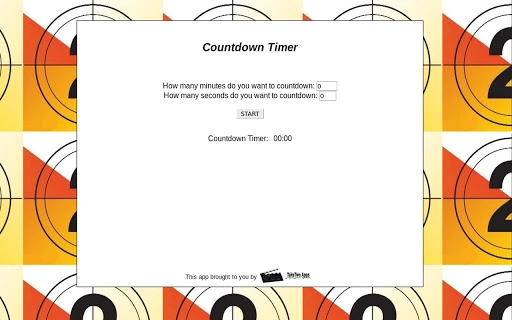
- Simple, Minimalist Interface – The app features a clean layout with essential controls, reducing visual clutter and enhancing focus.
- Non-Internet Dependent Operation – Once launched, the app functions without requiring an internet connection, ensuring privacy and reliability during use.
- Lightweight Design – With a file size of 10 MB, the application installs quickly and consumes minimal system resources.
These features support efficient time tracking in daily routines. For example, a student can set a 45-minute study block and receive a sound cue upon completion. A chef might use it to time a dish’s cooking duration. The alarm function ensures no time is missed, even during distraction-heavy tasks. The lightweight nature allows the app to run smoothly on older or low-resource machines, enhancing accessibility.
User Interface, Workflow & Performance
The user interface is designed around clarity and ease of use. A central display shows the remaining time in a large, readable format, with minimal controls for starting, pausing, and resetting the timer. Navigation is intuitive, requiring no learning curve, which benefits users of all technical skill levels. The workflow is linear: set time → start → wait → receive alarm.
Performance details were not specified by the developer. However, given the app’s lightweight footprint of 10 MB and its nature as a simple utility, it is expected to operate efficiently with minimal impact on CPU or RAM usage. The app does not include background processes or telemetry, which supports stable and predictable behavior. Stability is likely consistent across sessions, though no formal testing data was provided. The developer did not specify resource usage details, so actual performance may vary based on system configuration and concurrent software load.
Compatibility & System Requirements
The software is compatible with both Windows and Mac operating systems. The version number is 1.0, indicating a stable initial release. Installation size is 10 MB, which is compact and suitable for systems with limited storage. The developer did not provide additional system requirements, so users should ensure their devices meet general desktop application standards.
Exact system requirements were not listed. Platform compatibility information is limited to the supported operating systems. Users should verify that their system meets the minimum requirements for running desktop applications, particularly in terms of OS version and available memory. No specific hardware specifications were mentioned, so compatibility with older or newer machines remains unconfirmed. The developer did not provide detailed information on supported hardware or processor types.
Pros and Cons
Pros
- Free to download and use with no hidden costs
- Simple and intuitive interface suitable for all users
- Lightweight at only 10 MB in size
- Functions offline without requiring internet access
- Reliable alarm notification upon timer completion
Cons
- No advanced features such as recurring timers or multiple alarms
- Developer information is not publicly available
- Limited customization options for alarm sounds
- No progress tracking or history log for past sessions
- Unsupported on Linux and other non-Windows/Mac platforms
FAQ Section
Is the Countdown Timer App free to use?
Yes, the app is available at no cost. There are no subscription fees or in-app purchases required.
Does the app require an internet connection?
No, the app operates offline after installation. It does not rely on web services or cloud features.
Can I use the app on both Windows and Mac?
Yes, the software is compatible with both Windows and Mac operating systems.
Are updates available for the app?
Updates may be released by the developer to fix bugs or improve functionality. Users should check the official source for the latest version.
Is the app safe to download and install?
The app is designed as a desktop utility with no known security risks. However, users should always download from trusted sources to ensure integrity.
Final Thoughts + CTA
The Countdown Timer App delivers a focused, no-frills solution for users who need a reliable way to track time intervals. Its minimalist design, offline operation, and free access make it a practical tool for daily productivity. While it lacks advanced features, its core functionality is executed effectively.
This app is best suited for individuals seeking a simple, distraction-free timer for tasks like studying, cooking, or work sprints. For users who value simplicity and efficiency, it offers a dependable option. Download Countdown Timer App now.







